
Answer customer questions with a chatbot powered by business information you approve. Start with a free AI visibility scan, then create your AI Profile.
Welcome to Acme Studio. I can answer questions, collect project details, and help visitors request a consultation.
The scan checks possible gaps in the page you submit, not responses from individual AI platforms.
Build trusted AI visibility and serve website visitors
Publish an approved source that helps AI systems understand your business, services, and public information.
Bring the information from your profile directly to your website in an interactive visitor experience.
Use the business details, resources, services, and answers that you review during profile creation.
Collect names, emails, request details, and consent when website visitors want follow-up.
Answer common questions and guide visitors toward the right service, resource, or next step.
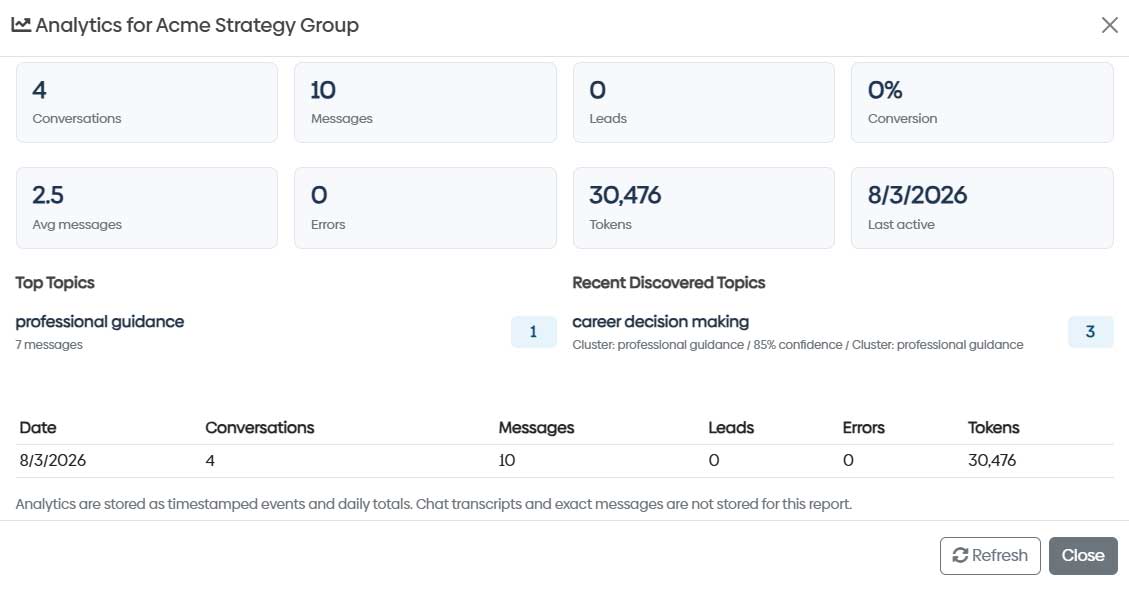
Learn what visitors ask about through conversation, message, lead, topic, and activity reporting.
The widget is added value, not a separate request
No separate widget request is required. Create your profile, approve your business information, and your widget is prepared automatically.
Your AI Profile and included website assistant are free during Early Access, with private Opportunity research and guidance on next steps available too. An account is required for profile creation.
When you create your AI profile, the approved information also prepares your website widget. Preview the launch button, adjust the presentation, and copy the embed code when you are ready to publish it.
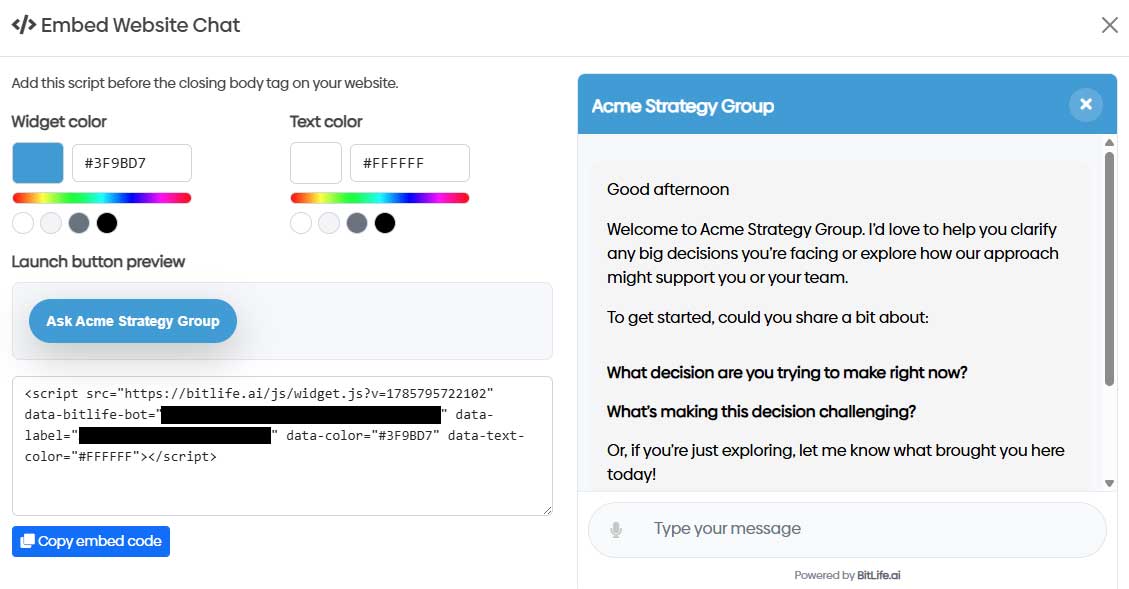
Your website widget can answer questions, collect lead details, and guide visitors toward the next step. Track conversations, messages, leads, discovered topics, and daily activity so the profile keeps delivering value on your site.
Start with a free AI visibility check
Check whether your website clearly explains your business to AI before creating your AI Profile.
Use your results to build an official profile from the business information you approve.
Review the business details, services, resources, and answers used to represent your organization.
Your website widget is generated automatically. Preview the experience and add the embed code when you are ready.
Here are your suggested videos. Click the ones you're interested in.
Click one of the Social links, or, copy and paste the link below into your favorite messaging or email client.
Copy this script and paste it before the closing </body> tag on your website.
At bitlife.ai, we're dedicated to providing exceptional value and an outstanding experience for our subscribers. By subscribing to our Premium Service, you'll unlock a whole new world of possibilities.
Join our community of satisfied subscribers who have already experienced the benefits of bitlife.ai. Don't miss out on the opportunity to enhance your experience and enjoy all the perks that come with being a valued subscriber.
Click the "Create Chat Link" button below to generate Chat link.
Click one of the Social links, or, copy and paste the link below into your favorite messaging or email client.
Upload, Analyze, and Get Instant Answers!
Not a premium subscriber yet?
* Tokens are the units used to measure the length of the text you want to upload. Every word, letter, and character in your content is counted as a token.
We have a maximum limit of ' + result.maxTokens + ' tokens for the file you wish to upload. To check how many tokens your document contains, you can use the tokenizer tool, available at this link: OpenAI Tokenizer Tool
We're sorry, but your document exceeds the allowed token limit.
Tokens are the units used to measure the length of the text you want to upload. Every word, letter, and character in your content is counted as a token.
We have a maximum limit of tokens for the file you wish to upload. To check how many tokens your document contains, you can use the tokenizer tool, available at this link: OpenAI Tokenizer Tool
This website uses cookies to enhance user experience and to analyze performance and traffic on our website. By clicking the "Accept" button below, you agree to our Cookie Policy.